Google is preparing to launch its next major mobile operating system, and the Android 17 update is packed with visual refinements, usability enhancements, and deeper privacy controls. Following a robust beta testing cycle from Beta 1 through QPR1 Beta 3, we now have a comprehensive look at the features that will likely shape the stable release.
Whether you are an Android enthusiast or just curious about what your phone will look like next, this guide covers the most impactful changes coming to your device.
Visual Overhauls: Frosted Glass and Bouncy Animations
One of the most immediate changes you will notice in the Android 17 update is the shift in Google’s design language.
-
Frosted Glass UI: Android 17 moves away from solid background colors in several areas, introducing a frosted glass-like blur effect. This is most noticeable when opening app folders, the widgets picker, or the power menu, as the UI softly reflects your wallpaper underneath.
-
Expressive Animations: Google has heavily integrated Material 3 expressive animations. Expanding the quick settings, dragging notification banners, and using the predictive back gesture now feature a fluid, bouncy animation that makes the OS feel much more responsive and playful.
-
Lock Screen Tweaks: The unlocking keypad now hides the fill-in spots until you start typing, and the tap-to-wake animation features a slick top-to-bottom slide for the media controls.
Enhanced Productivity and App Bubbles
Multitasking gets a significant boost in Android 17, making it easier to manage multiple applications simultaneously.
Floating App Bubbles
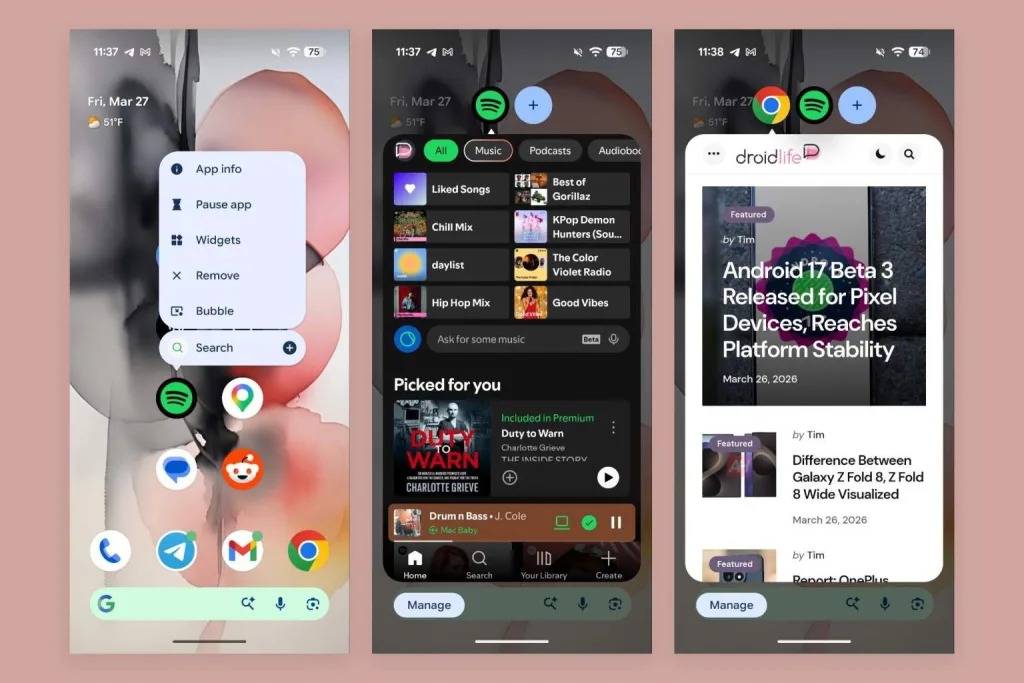
The new app bubble feature allows you to open almost any application in a floating window. You can drag these bubbles around the screen and snap them to the sides. The system supports up to four open apps at once in this floating view. If you open a fifth, it intelligently replaces the oldest app in the queue.
Screen Recording Simplified
The built-in screen recorder has been completely revamped. Instead of a cumbersome drop-down menu, Android 17 introduces an inline card that defaults to recording your most recently used single app. Stopping a recording now opens a dedicated local media player where you can preview, edit, or delete the clip immediately, rather than forcing you to dig through Google Photos.
Smarter Display and Comfort Features
Protecting your eyes during extended screen time is a major focus of this update.
Google has introduced a new menu under Display settings called Comfort Filters. This section combines the standard Night Light (which limits blue light) with a brand new feature called Comfort View.
-
Comfort View: This filter reduces eye strain by giving the screen a softer, more pastel appearance, taking the harsh edge off vibrant colors.
-
Dynamic Adjustment: You can run both Night Light and Comfort View simultaneously, and even set them to dynamically adjust based on the system’s analysis of your environment.
Deepened Privacy and Security
In the modern digital landscape, mobile security is paramount. Android 17 introduces subtle but powerful tools to keep your data safe.
The Privacy Dashboard now features a dedicated section for App and AI Assistant Activity. As AI becomes more integrated into the OS (like Gemini), this dashboard allows you to see exactly what data the assistant is accessing. Furthermore, the updated Network settings now let you share a Wi-Fi connection without giving the recipient the ability to edit or modify the network credentials.
The Android 17 update proves that Google is focused on refining the user experience. By combining elegant visual upgrades like the frosted UI with practical tools like Comfort Filters and enhanced screen recording, this update is set to make our devices more enjoyable and safer to use.
If you liked this article, also read: The Nvidia RTX Spark Is Powering the Next Era of Local AI